flowchart LR X["EEG (22 ch x 1125)"] --> T["Temporal conv"] T --> S["Spatial conv"] --> P["Square -> pool -> log"] --> C["Classifier"]
engram Cookbook
reference
quarto
The handbook for this repo - how it’s structured, the publishing workflow, and the Quarto authoring patterns I use, each shown as source + rendered output.
How to use this cookbook
This is the living handbook for engram - a reference I keep coming back to and extend as I learn. It covers two things:
- How the repo works - structure, conventions, and the render/publish workflow.
- How to author a notebook - the Quarto features worth using.
For every visual feature in Part 2 you get two blocks: a Source block (the markup that produces it) and a Renders as block (what Quarto produces from it). Render locally with quarto preview to see the rendered halves live.
When you adopt something new, add a section and append a line to the Update log.
Note
A .ipynb carries Quarto front matter in a raw cell at the very top (the cell above this one). In a .qmd file the same YAML sits between --- fences.
Part 1 - The repo
Adding a new notebook
- Drop the
.ipynbinto the relevant project folder (or create a new folder). - Add a front-matter raw cell at the top (see the starter).
- Add a Colab badge as the first markdown cell.
- Cite any papers with
@keyand add the entries toreferences.bib. - Run the notebook and save it with its outputs, then commit and push.
The notebook then appears automatically on the homepage listing - no manual index edit.
Render & publish workflow
The build never executes notebooks — it renders the outputs already saved in each .ipynb (execute: enabled: false in _quarto.yml). The runner needs no Python, no dependencies, and never downloads data.
So the rule is: run a notebook (locally or in Colab), save it with its outputs, then commit. A notebook committed without outputs renders with no figures.
quarto preview        # live preview while editing (renders saved outputs)
git add . && git commit -m "Add notebook" && git push
Pushing to main triggers the Action, which publishes to the gh-pages branch -> GitHub Pages at bkowshik.github.io/engram.
Part 2 - Authoring with Quarto
Each section below pairs the Source (what you write) with Renders as (what Quarto produces).
Front matter & metadata
Every notebook opens with a raw cell of YAML. This drives the title, the listing entry, categories, and per-document options. (The “rendered” effect here is the page’s title block and listing entry, not inline output.)
Source
---
title: 'Short, specific title'
description: 'One line - shown in the listing and the social card.'
date: '2026-06-16'
date-modified: last-modified # auto-updates from file mtime - good for living docs
categories: [eeg, pytorch, bci] # power the tag filter + listing
bibliography: references.bib # enables @citations
toc: true
code-tools: true # adds the "view source / copy" menu
image: thumbnail.png # optional - used in the social preview card
---
Callouts
Coloured boxes for asides, insights, and gotchas. Flavours: note, tip, warning, important, caution.
Source
::: {.callout-tip}

## Key insight

The takeaway in one or two sentences.
:::

::: {.callout-warning collapse="true"}

## Gotcha (collapsed by default)

Add `collapse="true"` to fold long asides.
:::
Renders as
TipKey insight
The takeaway in one or two sentences.
WarningGotcha (collapsed by default)
Add collapse="true" to fold long asides.
Math
Source
Inline: $h_t = \sigma(W x_t + b)$

$$
\mathcal{L} = \frac{1}{N}\sum_{i=1}^{N} -\,y_i \log \hat{y}_i
$$ {#eq-nll}

Reference it with `@eq-nll`.
$$
Renders as
Inline: \(h_t = \sigma(W x_t + b)\)
\[ \mathcal{L} = \frac{1}{N}\sum_{i=1}^{N} -\,y_i \log \hat{y}_i \tag{1}\]
The negative log-likelihood in Equation 1 is the loss the Shallow ConvNet trains with. $$
Citations & bibliography
With bibliography: references.bib in the front matter, cite inline and Quarto builds the reference list automatically.
Source
The Shallow ConvNet comes from @schirrmeister2017.
A parenthetical citation looks like [@schirrmeister2017].
…resolving against this .bib entry:
@article{schirrmeister2017,
  title   = {Deep learning with convolutional neural networks for EEG decoding and visualization},
  author  = {Schirrmeister, Robin Tibor and others},
  journal = {Human Brain Mapping}, year = {2017}, volume = {38}, pages = {5391--5420}
}
Renders as
The Shallow ConvNet comes from Schirrmeister et al. (2017). A parenthetical citation looks like (Schirrmeister et al. 2017). (The full reference appears in the auto-generated list at the end of the page.)
Diagrams (Mermaid & Graphviz)
Diagram-as-code - perfect for an architecture sketch instead of an ASCII block.
Source (4 outer backticks so the inner block shows literally)
```{mermaid}
flowchart LR
  X["EEG (22 ch x 1125)"] --> T["Temporal conv"]
  T --> S["Spatial conv"] --> P["Square -> pool -> log"] --> C["Classifier"]
```
Renders as
Code cells: source + output together
A code cell is the clearest case: by default Quarto shows both the source and the output it produces. The cell below is labelled and captioned so the figure can be cross-referenced - and its code stays visible above the plot.
Set %config InlineBackend.figure_format = "retina" once near the top so the saved plots are crisp on hi-DPI screens.
import numpy as np
import matplotlib.pyplot as plt
%config InlineBackend.figure_format = "retina"   # crisp hi-DPI plots

t = np.linspace(0, 1, 500)
x = np.sin(2 * np.pi * 10 * t)

plt.figure(figsize=(6, 2.4))
plt.plot(t, x)
plt.xlabel("Time (s)"); plt.ylabel("Amplitude")
plt.tight_layout()
plt.show()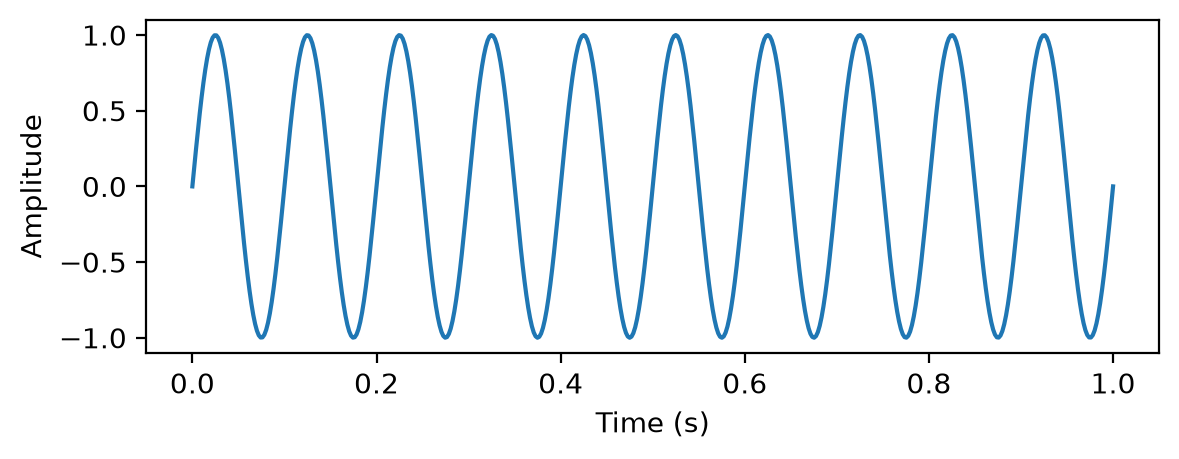
Figure 1 shows the rendered output above, directly under the code that produced it. Control what each cell reveals with cell options:
| Option | Effect | |
|---|---|---|
# | echo: false |
hide the code, keep the output | |
# | output: false |
run the code, hide the output | |
# | code-fold: true |
keep the code but collapse it behind a toggle | |
# | label: fig-x/tbl-x |
make it cross-referenceable (the fig-/tbl- prefix matters) |
|
# | fig-cap: "..." |
figure caption | |
# | warning: false |
suppress warnings in the render |
The default (echo: true) is exactly the “show both” behaviour - use the options above only when you deliberately want to hide one half.
Cross-references
Source
See @fig-signal and @eq-nll. Sections work too: tag a heading `{#sec-setup}`, then `@sec-setup`.Renders as
See Figure 1 and Equation 1. Quarto numbers and links them automatically, so references never go stale when you reorder.
Tabsets
Stack alternatives behind tabs - handy for “same idea, two frameworks”.
Source
::: {.panel-tabset}

## NumPy

```python
import numpy as np
x = np.zeros((22, 1125))
```

## PyTorch

```python
import torch
x = torch.zeros(22, 1125)
```

:::
Renders as
import numpy as np
x = np.zeros((22, 1125))
import torch
x = torch.zeros(22, 1125)Figures, captions & lightbox
Source
{#fig-arch}Enable click-to-zoom for all images via _quarto.yml:
format:
  html:
    lightbox: true
Renders as: a captioned, numbered figure (Figure 1: ...) that is cross-referenceable with @fig-arch and opens in a zoom overlay on click.
Listings, categories & search (site-level)
These live in _quarto.yml / index.qmd, but every notebook feeds them:
- Listing -
index.qmdauto-indexes every**/*.ipynb, sorted bydate. - Categories - the
categories:in each notebook become clickable filters. - Full-text search - on by default; searches every notebook, client-side, free on GitHub Pages.
No execution on build
engram sets this in _quarto.yml:
execute:
  enabled: false # render saved notebook outputs; never launch a kernel
This keeps publishing trivial: do the heavy compute wherever suits you (Colab, a GPU box, locally), save the notebook with its outputs, and the build just renders those - no kernel, no dependencies, no dataset downloads on CI.
If you would rather have the build execute notebooks and cache the results, the alternative is execute: freeze: auto plus a committed _freeze/ directory - but that needs the full environment available at render time.
Colab badge
Source (first markdown cell of a notebook)
[](https://colab.research.google.com/github/bkowshik/engram/blob/main/FOLDER/NOTEBOOK.ipynb)Renders as: a clickable “Open In Colab” badge that launches the notebook in Google Colab.
Copy-paste starter
Front matter for a new notebook (raw cell at the top):
---
title: ''
description: ''
date: 'YYYY-MM-DD'
date-modified: last-modified
categories: []
bibliography: references.bib
toc: true
code-tools: true
---
Before you push:
Update log
Append a line whenever you learn or adopt something new.
| Date | Change |
|---|---|
| 2026-06-16 | Created. Each Part 2 feature now shows Source + Renders-as; example plot cell shows code and output together. |
References
Schirrmeister, Robin Tibor, Jost Tobias Springenberg, Lukas Dominique Josef Fiederer, et al. 2017. “Deep Learning with Convolutional Neural Networks for EEG Decoding and Visualization.” Human Brain Mapping 38 (11): 5391–420. https://doi.org/10.1002/hbm.23730.
Social cards, comments & formats (site-level config)
These are
_quarto.ymlsettings rather than inline output:Render a slide deck from any notebook with
quarto render notebook.ipynb --to revealjs.